Workflow software for bookkeepers
Workflow software for bookkeepers
Stop chasing clients for invoices and receipts. DoxBox is workflow software for bookkeepers that automatically collects, organizes, tracks, and exports documents from one centralized system. Reduce manual work, improve accuracy, and gain real-time visibility across all your clients – so you can focus on the work that actually matters
Just for you
Designed specifically for document-heavy bookkeeping work
Focus on invoice, receipt, and expense workflows – not generic tasks
Eliminates scattered emails, WhatsApp files, and manual uploads
Supports solo bookkeepers and growing bookkeeping firms
End-to-end bookkeeping workflow from collection to export
How Doxbox works for bookkeepers
Doxbox handles the repetitive document work so you can focus on bookkeeping. Here's how it streamlines your entire workflow
Automatic document collection
Doxbox automatically collects invoices and receipts from WhatsApp and email, with no manual downloads or inbox searching required.
Smart data extraction with OCR
Doxbox automatically extracts key invoice data such as vendor, amount, VAT, date, and currency. Reduce manual entry, improve accuracy, and save bookkeeping time
Centralized client
dashboard
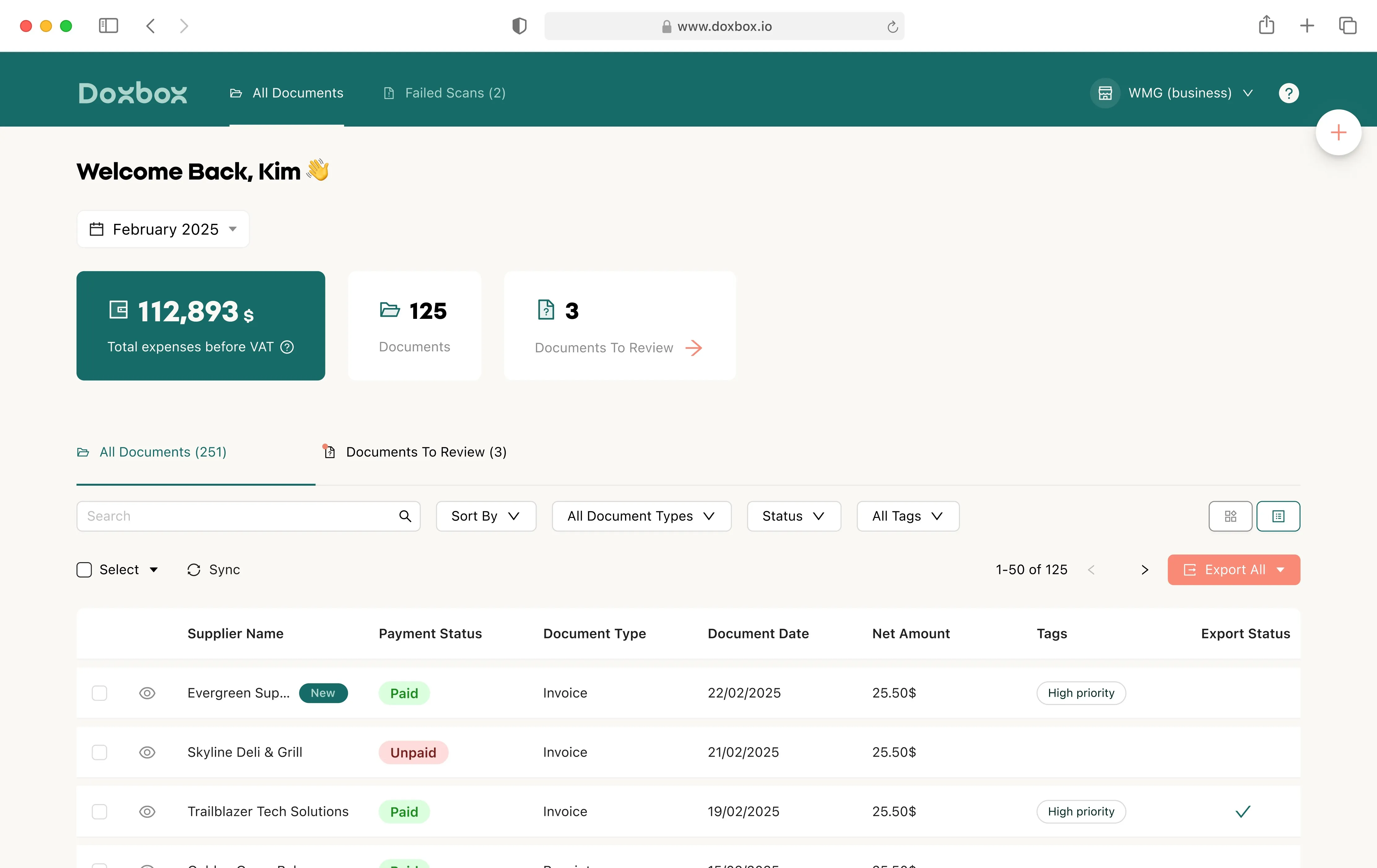
Manage all client documents in one dashboard. Filter by client, month, vendor, or status and instantly see what’s collected, processed, or missing
Workflow tracking & status visibility
Track documents from collection to export with full status visibility. Identify missing or duplicate documents early and keep your bookkeeping workflow on track
What you can do with Doxbox
Doxbox isn't just storage – it's a complete bookkeeping operations management software that transforms how you handle documents
Manage daily bookkeeping workflows
Invoices, receipts, and expense documents are automatically organized with no manual folders or file renaming. Built-in task tracking keeps daily bookkeeping fast, clean, and scalable
Prepare accountant-ready exports
Export clean summaries in multiple formats and share records without back-and-forth. Seamless handoffs make reviews and tax prep faster as your practice grows
Maintain ongoing workflow accuracy
Duplicate detection and consistent data extraction keep records accurate and reliable. Catch errors early and maintain audit-ready workflows with confidence
Real benefits for bookkeepers
It's all about efficiency. Here's what Doxbox delivers for bookkeepers every day:
Save time on manual bookkeeping tasks
No manual downloads or sorting. Documents arrive already organized, saving hours of admin work every week
Improve accuracy & confidence
OCR-based extraction reduces errors and keeps records clean. Reliable data means confident reporting and fewer fixes later.
Scale your
bookkeeping
Handle more clients with scalable workflows and built-in collaboration, so you can grow without increasing admin workload.
Security & trust bookkeepers can rely on
Your clients trust you with sensitive financial data. Doxbox protects that trust
Feature 1: Secure cloud storage
Encrypted storage for all financial documents. Secure backups to prevent data loss. Your clients' invoices and receipts are protected at every step
Feature 2: Controlled access & permissions
Role-based access for teams. Protect sensitive client data with granular permissions. The right people see the right documents – nothing more
Easy to use
Built for document workflows, not generic task tools
Automates document collection instead of manual uploads
Provides real-time visibility across all clients
Reduces admin stress and improves client experience
Bookkeeping practice management software that actually understands bookkeeping.
What we do best
Get started with Doxbox in minutes
Simple setup. Immediate results. Here's how to start transforming your bookkeeping workflow:
Sign up
Easy connection with your Apple or Gmail account for seamless access.
Setup
Connect
Connect your work email inbox for auto collecting of invoices
Let's Dox
Doxbox organize all your receipts and invoices so you can focus on your clients
Start now
Ready to transform your bookkeeping workflow?
Join bookkeepers who save hours every week with Doxbox workflow software. Stop chasing documents and start growing your practice
Free trial
Setup in under 5 minutes
Works with your existing tools
FAQs
Frequently asked questions
How does Doxbox help bookkeepers save time?
How does Doxbox help bookkeepers save time?
DoxBox automates the most time-consuming parts of bookkeeping document management. Instead of manually downloading invoices from emails, chasing clients for receipts, and organizing files into folders, DoxBox collects documents automatically from email and WhatsApp, extracts the key data using OCR, and organizes everything in one dashboard. Most bookkeepers save 5-10 hours per week on document handling alone
Can I manage multiple clients from one dashboard?
Can I manage multiple clients from one dashboard?
Yes. DoxBox is designed for bookkeepers managing multiple clients. The centralized client dashboard lets you view all clients in one place, filter by client, month, vendor, or status, and see exactly which documents have been collected, processed, or are missing. No more switching between folders or losing track of client documents
Does Doxbox help close the books faster each month?
Does Doxbox help close the books faster each month?
Absolutely. With automatic document collection, real-time status visibility, and accountant-ready exports, DoxBox eliminates the end-of-month scramble. You can see exactly which documents are missing, export clean summaries for accountants, and reduce the back-and-forth that slows down month-end close. Faster month-end close for bookkeepers is a core benefit
Does this workflow software work with QuickBooks and Xero?
Does this workflow software work with QuickBooks and Xero?
Yes. DoxBox exports data in formats compatible with QuickBooks, Xero, and other popular accounting software. You can export summaries and documents directly, keeping your existing workflow intact while adding powerful automation for document collection and organization
How does Doxbox reduce bookkeeping errors?
How does Doxbox reduce bookkeeping errors?
Manual data entry is the biggest source of bookkeeping errors. DoxBox reduces errors by automatically extracting data from invoices and receipts using OCR – no typing required. Duplicate detection catches double entries before they cause problems. Consistent extraction means reliable records and fewer corrections later