
Receipt scanner software
Receipt scanner software
Transform how your business handles receipts with Doxbox's powerful receipt scanner software. Our OCR receipt scanner captures, extracts, and organizes expense data in seconds - eliminating manual data entry, simplifying tax preparation, and giving you complete control over expense management. Whether you're tracking business expenses, preparing for audits, or streamlining reimbursements, Doxbox is the best receipt scanner software for businesses of any size
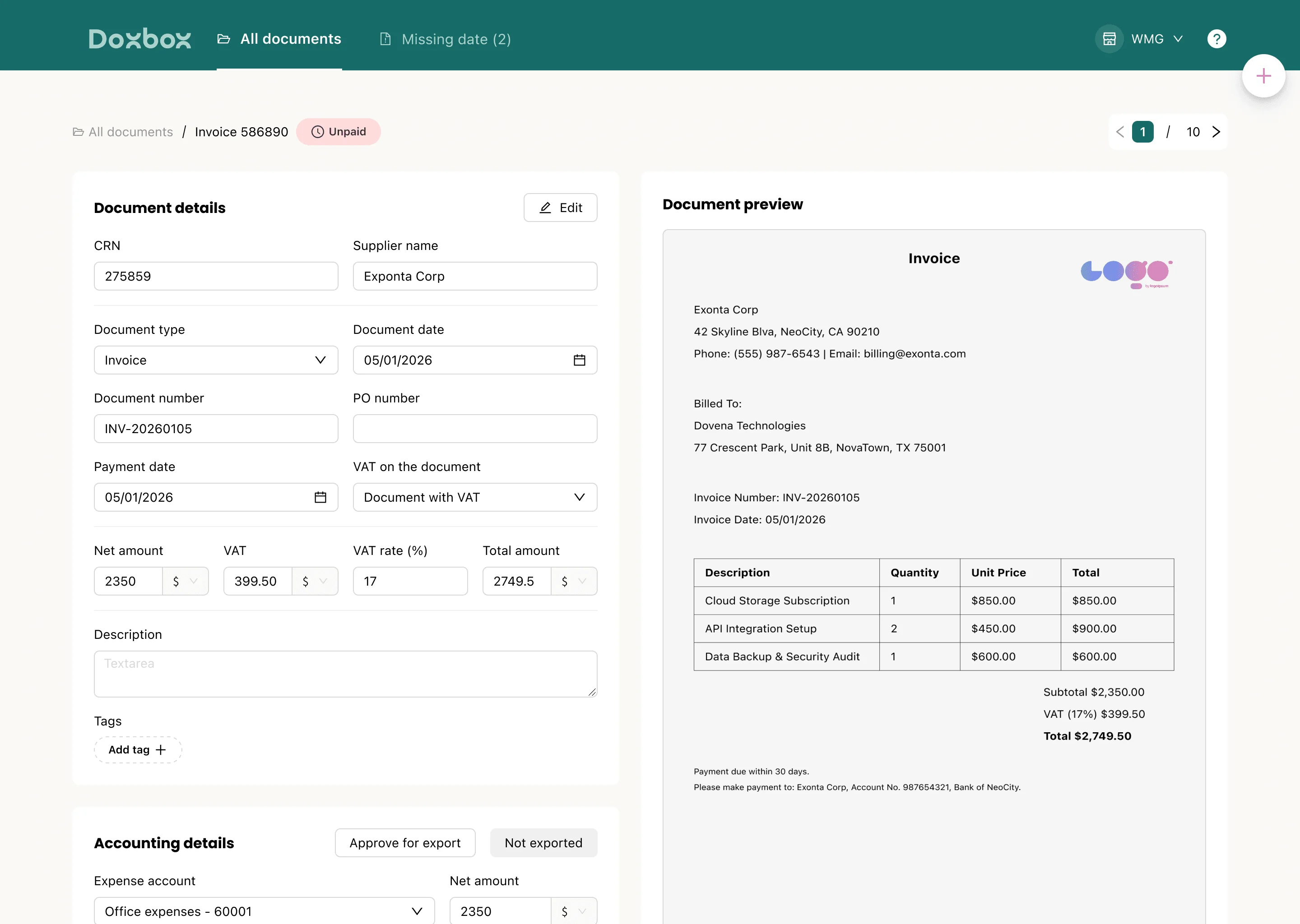
How our receipt scanner software works
Doxbox makes receipt management effortless with a simple three-step process that takes you from paper chaos to organized digital records
Step 1: Capture your receipts
Capture receipts however works best for you. Snap photos with your mobile device, upload PDFs from your desktop, connect your email or WhatsApp to integrate for automated capture. Our system handles physical receipts, e-receipts, and digital invoices with equal ease.
Step 2: Extract & validate data
Our AI-powered OCR engine instantly extracts all relevant data: line items, amounts, dates, tax details, currencies, and vendor information. Receipts are automatically categorized based on your rules. For critical expenses, you can use human verification ensures every detail is correct
Step 3: Generate reports & integrate
Doxbox automatically creates expense reports ready for submission or reimbursement. Export data directly to your accounting software, ERP system, or spreadsheets. All receipts are stored in IRS-accepted digital format ensuring you're always prepared
Features that make our receipt scanner software stand out
Auto-categorized expenses
Receipts are automatically categorized and organized in one smart dashboard
multi-currency capture
Detailed line-item data with accurate multi-currency support
Accounting Sync – Soon
Sync seamlessly with your accounting and financial tools
Mobile & desktop access
Capture receipts anywhere, manage everything in one place
Minimize errors and improve financial accuracy across your organization
Automated workflows and instant processing free your team for higher-value work
Automatic deduction tracking and IRS-ready digital storage
Centralized expense management with scalable processing for any volume
How to get started with our receipt
scanner software
Step 1: Sign up
and setup
Getting started is fast and easy. Register your account, complete minimal configuration, and you're ready to go. Doxbox works across all your devices desktop and mobile app
Step 2: Import & scan receipts
Choose how you want to capture receipts: drag-and-drop uploads, email forwarding, mobile camera capture, or WhatsApp. Every method delivers the same accurate results
Step 3: Automate, categorize, export
Let Doxbox's AI-powered extraction and auto-categorization organize your expenses automatically. watch data flow seamlessly into your systems
Get started with Doxbox
Ready to simplify your expense management? Join thousands of businesses already saving time and money with Doxbox your advance document management system software. Setup takes minutes, and the benefits start immediately.
Easy setup with instant benefits
High ROI from day one
Stop losing receipts and missing deductions
Join thousands of satisfied businesses
FAQs
Frequently asked questions
What's the best software to use for scanning receipts?
What's the best software to use for scanning receipts?
The best receipt scanner software combines accurate OCR technology, and user-friendly mobile capture. DoxBox delivers all with an AI-powered data extraction that achieves 95%+ accuracy, and intuitive mobile scanning that works in seconds
How do I store receipts digitally?
How do I store receipts digitally?
Digital receipt storage is simple with DoxBox. Capture receipts via mobile photo, email forwarding, or file upload. Our OCR technology extracts all data automatically, then stores the original image and extracted data in a secure cloud storage. Receipts are searchable, organized by category, and retained for as long as you need them.
Are receipt scanning tools actually worth it?
Are receipt scanning tools actually worth it?
Absolutely. Businesses using receipt scanner software typically reduce manual data entry by 95% and cut expense processing time significantly. The time savings alone often pay for the software many times over, and the reduction in errors, missed deductions, and audit risks adds even more value. For any business processing more than a handful of receipts monthly, automated scanning delivers strong ROI.
Can it handle multiple currencies or international receipts?
Can it handle multiple currencies or international receipts?
Yes, DoxBox fully supports multi-currency receipt processing. Our OCR engine recognizes currencies from around the world, extracts amounts accurately, and can convert to your base currency for reporting. This makes DoxBox ideal for businesses with international travel, global vendors, or multi-country operations.
Can I manage and categorize expenses automatically?
Can I manage and categorize expenses automatically?
Yes, automatic expense categorization is a core feature of DoxBox.
Who should use receipt scanner software?
Who should use receipt scanner software?
Receipt scanner software benefits anyone who needs to track expenses: small business owners managing their own books, finance teams processing employee expenses, accountants handling client documentation, freelancers tracking deductible expenses, and enterprises managing high-volume receipt processing. If you have receipts, DoxBox can help you manage them more efficiently.